Icecream Video Converter Pro 1.50 Multilingual [pac]
INFO HASH: F00ADAE7C16E21F9CD0237D6B28D6AC847BE5F35
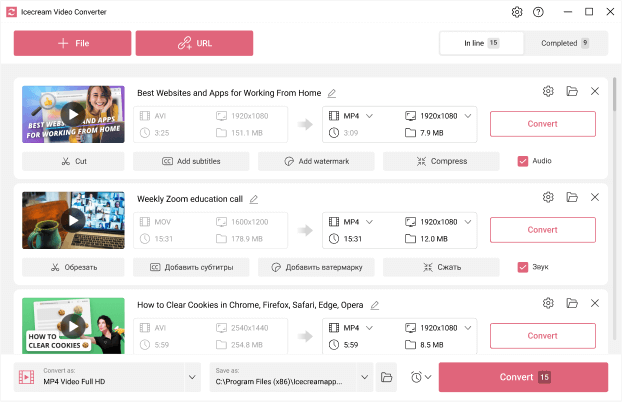
Meet Icecream Video Converter – brand new video converter for Windows. Convert any of your videos via user-friendly GUI on a daily basis.
features
Bulk conversion
Add multiple files to converting queue to change format of your videos in a bulk in just a single click. Apply output settings to all files if needed. Converting videos one by one is still available.
All popular formats
Video Converter supports all the most popular video formats: MP4, AVI, MKV, 3GP, WMV, MOV, M4V, MPG, M2TS, MTS and others.
Device presets
Not sure about the format, resolution or other settings for the output file? Convert your videos according to the built-in presets (iPad, iPhone, Android, PS5, etc).
Trim videos
If you only need to convert part of a video, there's no need to install additional video editing software. Cut the video directly in the video file converter GUI and select a specific scene to convert.
Video to MP3
Icecream Video Converter enables you to convert video to audio, too. Export soundtrack or background audio as MP3.
Conversion history
All the previously converted files are conveniently stored in the 'History' section of the program. Manage your conversions like a pro.
Compress videos
You can perfectly compress your files with the video converter. Just set the needed compression level for the file in the conversion queue.
Add watermark
Easily add a custom watermark to your output videos. Use an image or text as a watermark, set its size, transparency, angle and more.
Mute videos
Another handy option of the video converter: turn off the sound in the converted video file with a single mouse click.
What's New
System Requirements: Windows 11, 10, 8.1, 8, and 7.
https://www.virustotal.com/gui/file/cec80fbe2cdbefe70a72d2a9eb81e8c8599213463438d0e1e632eb670e6bcb90
https://www.virustotal.com/gui/file/94c9d839f00aeca076652b19ae06ae10df9f16949737ca26a39188f619c55d43