FonePaw Screen Recorder 8.7 (x64) Multilingual Final Incl Patch
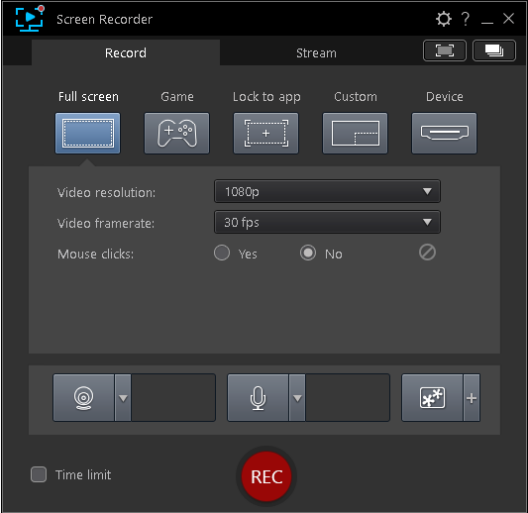
FonePaw Screen Recorder is a professional tool to record any video/audio and capture screen on your Windows or Mac computer. This excellent video screen recording software can help you easily get online movies and radio, record games, make video tutorials, capture webcam videos, take screenshot, etc. on your computer. Also, you are able to annotate your recording with a text box, arrow, highlight and more.
Apart from videos, FonePaw Screen Recorder can also record audio only on your Windows or Mac computer. This feature enables you to record many kinds of music, radios or online audios instead of downloading them. You can save the audio recording on your computer in MP3/WMA/AAC/M4A for easy playback.
Apart from videos/audio recording, Apeaksoft Screen Recorder also enables you to capture your Windows/Mac screen with ease. This function allows you to get the screenshot as you want. In addition, you can make drawings on the capture as well. For example, you are able to mark up your screenshot with a text box, arrow, highlight and more.
1. Intuitive User Interface: FonePaw Screen Recorder welcomes users with its clean and intuitive interface. Navigating the software is a breeze whether you're a tech-savvy individual or a beginner. The user-friendly layout ensures that you can start recording your screen, webcam, or audio effortlessly, making it an ideal choice for those new to screen recording.
2. Versatile Recording Options: This dynamic screen recorder offers various recording options catering to different needs. Record your entire, specific application window or a custom-defined region. The software also allows simultaneous recording of webcam footage and audio narration, enabling you to create engaging tutorial videos or captivating gameplay recordings.
3. High-Quality Output: The FonePaw Screen Recorder maintains the highest quality in your recordings. Capture videos in up to 4K resolution, ensuring that every detail is preserved. Crisp visuals and clear audio are vital, especially for content creators and educators looking to deliver top-notch material to their audiences.
4. Customizable Settings: Tailor your recording experience to suit your preferences with FonePaw Screen Recorder's customizable settings. Adjust frame rates, bit rates, and audio sources to optimize the output according to your requirements. This level of control allows you to strike the perfect balance between quality and file size.
5. Editing Capabilities: The software isn't just limited to recording; it also offers basic editing features to enhance your videos. Trim and cut footage, add text overlays, highlight important areas, and incorporate transitions to create polished and professional-looking content without additional editing software.
6. Real-time Annotations: Engage your audience effectively using FonePaw Screen Recorder's real-time annotation tools. Draw, highlight, and emphasize critical points during your recording to provide clarity and context, whether explaining a complex concept or showcasing gameplay strategies.
7. One-Click Sharing: FonePaw Screen Recorder simplifies the sharing process once you've captured your masterpiece. Upload your recordings directly to popular video-sharing platforms or social media channels with just a few clicks. Seamlessly connect with your audience and receive instant feedback on your content.
How to use:
0. Disable antivirus [Important].
1. Install Program (remove any previous patch/Install).
2. Copy Patch to the install Folder and apply patch.
3. Done, enjoy the Software & Please seed for 36hrs.
Important: See virustotal scans: [Don't worry it's safe to install and we tested it before sharing]
https://www.virustotal.com/gui/file/833b8761576caaa27dbf0ffeb8d632fec16c393a0316f3614658e9d614505bff
https://www.virustotal.com/gui/file/a47acba1662e9d336d6a3859daf6cb911e02d45c79243db57c8681d6e49e6b9f